Particle Area Components
Particle area components define where particles spawn, from within the scene instead of within the effect. They are used for things like fog banks, dust in a room or embers above a fire pit, where the size and shape of the spawn area depends on the level, but the effect should be authored only once.
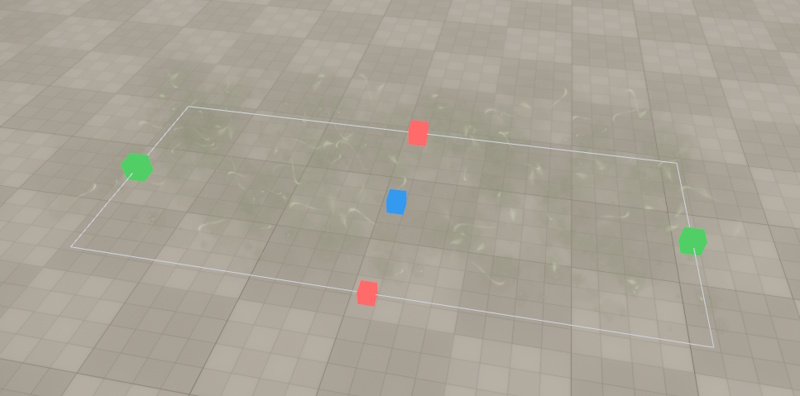
There are three types, matching the box, sphere and cylinder position initializers:
| Component | Used by |
|---|---|
| Particle Box Area | Box Position Initializer |
| Particle Sphere Area | Sphere Position Initializer |
| Particle Cylinder Area | Cylinder Position Initializer |
Enabling Areas
A box, sphere or cylinder position initializer only uses areas if its UseSpawnArea property is enabled, which it isn't by default. All other initializers ignore areas, so an effect that merely is a child of an object with an area keeps the shape it was authored with.
Don't enable UseSpawnArea for effects that are spawned by other effects. Those share the owner object of their parent effect, so they would spawn in the whole area, instead of at the parent particle.
How Areas Are Found
A position initializer looks for an area of its own type on the object that the particle effect component is attached to, and if none is found there, it traverses upwards in the object hierarchy until it finds one.
A box position initializer only uses box areas, and so on. Areas of other types are ignored. So if an effect uses for example both a box and a sphere position initializer, you can put a box area and a sphere area on the same object, and each initializer uses its matching area.
Without an area of the matching type (for example in the particle effect editor), an initializer uses the shape that it defines itself.
What the Area Replaces
The area replaces the position and the size of the initializer's shape. The particles spawn at the position and with the rotation and scale of the area's object, not the position of the effect.
The initializer's PositionOffset still applies, in the space of the effect. It is not affected by the rotation and scale of the area, so that an effect can keep several layers apart by the same distance in any area.
The initializer still decides how the shape is used:
- A box position initializer with a size of
0along an axis stays flat along that axis. For example an initializer with a size of(1, 1, 0)spawns particles in a rectangle, also when the box area has a height. - A cylinder position initializer with a height of
0spawns particles in a disc (or on a ring), ignoring the height of the area. OnSurfaceandSetVelocitywork the same as without an area.
The scale parameters of the initializer (e.g. ScaleXParam) still apply, on top of the size of the area.
Particle Density
The initializer's own shape defines the particle density. When an area is used, the number of particles that the emitters spawn is scaled by how much larger the area is than the initializer's shape. For example, if an effect spawns 100 particles in a 1x1x0 box position initializer, a box area of 10x5 spawns 5000 particles. For spheres and cylinders, the volume or, with OnSurface, the surface area is compared.
Component Properties
SpawnScale: An additional factor for the number of particles that spawn in this area. Use it to make one area more or less dense than the effect is authored for.
Size (Box Area): The full size of the box, centered at the object.
Radius (Sphere Area): The radius of the sphere.
Radius, Height (Cylinder Area): The size of the cylinder. The cylinder is aligned with the object's Z axis and centered at the object.