Voxel Grid Component
This component adds a 3D voxel navigation grid to a scene. The grid is a box centered on the component's game object. When the scene starts simulating, the collision geometry inside the box is rasterized into voxels, which then describe where objects can move through.
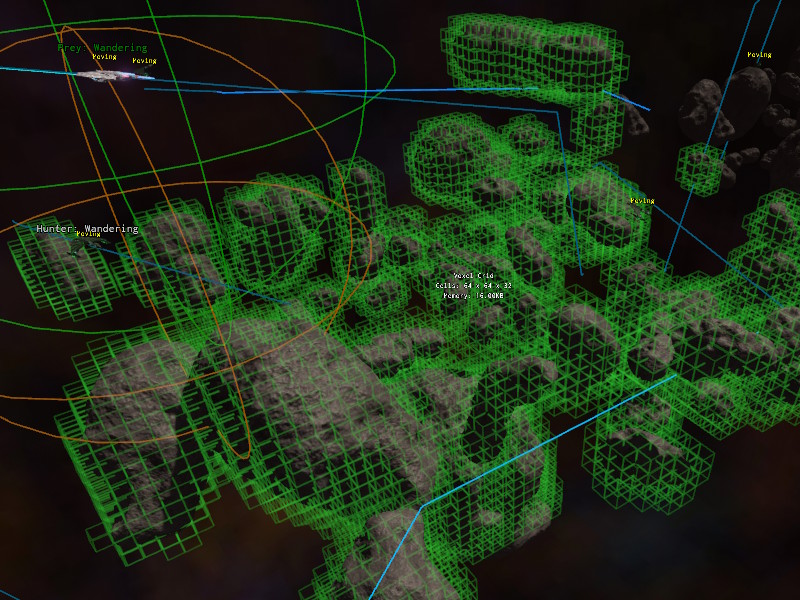
Multiple grids can be placed in a scene. A path search can span several of them, and space that isn't covered by any grid is treated as free, so grids only need to be placed around the areas that contain obstacles.
Memory usage and voxelization cost grow with the size of the box and with the number of voxels, so use the largest voxel size that still resolves the gaps that objects are supposed to fly through.
The grid is only voxelized once. Changes to the geometry afterwards are not picked up.
Make the box large enough to fully contain the geometry that it should cover, and leave a margin of free voxels at its edges. Paths that come from outside the grid enter it through the voxel that the straight line towards the destination hits first. If that part of the boundary is occupied, the path search fails. See Entering and Leaving Grids.
Component Properties
Size: The size of the box in world units. The box is centered on the game object's position.VoxelSize: The edge length of a single voxel. Smaller values resolve narrow passages more accurately, but increase memory usage and voxelization time.CollisionLayer: The collision layer that determines which geometry is rasterized into the grid. Use this to exclude high-detail geometry or objects that should not block navigation.Visualize: If enabled, the occupied voxels are drawn using the debug renderer. The CVarAI.VoxelGrid.Visualizedoes the same for all grids in the scene.