Voxel Path Test Component
This component is for testing 3D voxel navigation in the editor.
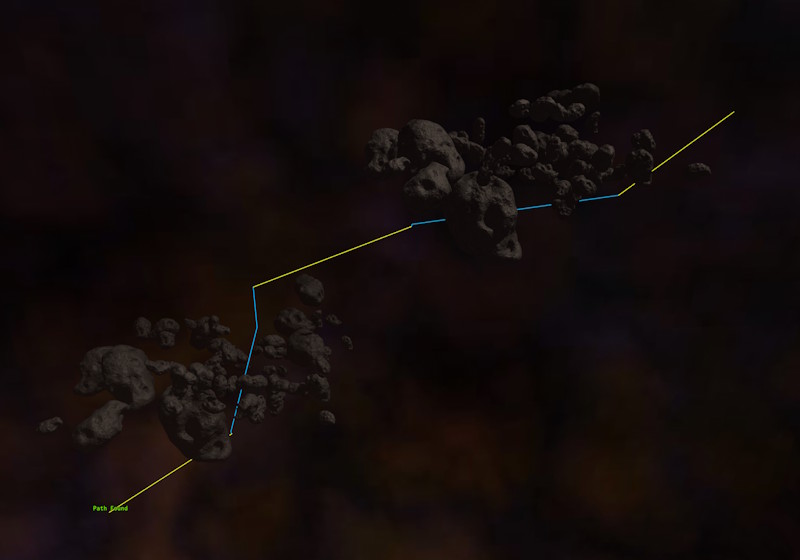
Place an object with this component in your scene, then specify another object as the PathEnd. Make sure there are voxel grid components that cover the obstacles between the two.
Path searches are only possible while simulating a scene, so press the play button to test it. The path is then recomputed and displayed every frame. Segments that run through a voxel grid are drawn in a different color than segments that cross space which isn't covered by any grid, since the latter are straight lines that don't avoid any obstacles.
Recomputing the path every frame is intentionally wasteful. Use this component to check a scene setup, not as part of a shipping scene.
If no path shows up, use VisualizePathState to see why the search failed, and enable the visualization of the voxel grids to check that they were generated as expected. A common reason for failure is that the start or end position lies inside an occupied voxel.
Component Properties
PathEnd: A reference to another object that acts as the path's destination.VisualizeSmoothedPath: If enabled, the path that navigation would actually use is drawn.VisualizePathState: If enabled, the result of the path search is printed as text at the location of this object.SearchMargin: How much extra space around the start and destination is searched for voxel grids.MaxIterationsPerHop: The maximum number of A* steps that may be spent within a single voxel grid. Lower values prevent frame stalls in large grids, but may make long paths fail.MaxHops: Through how many voxel grids a path may pass.